v1.0 Released · Open Source MIT · 6 Channels · View on GitHub →
开源免费 · MIT 协议

One component
handles every login

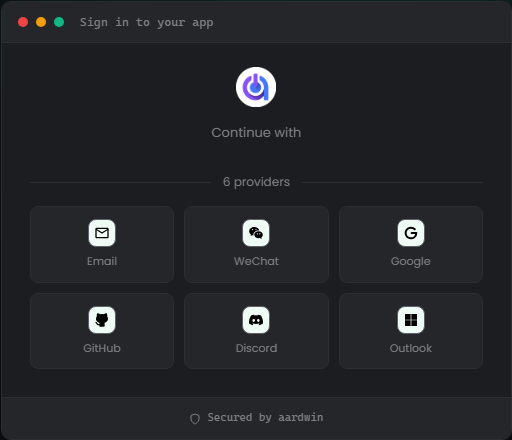
A plug-and-play Web Component that aggregates six login channels — Email, WeChat, Google, GitHub, Discord, and Outlook. Auth flows, callbacks, and secure code exchange are fully managed; your frontend work ends here.
No third-party platform accounts
Core features free forever
Static preview of the Aardwin authentication component (Email, WeChat, Google, GitHub, Discord, Outlook)

Static preview of the component — the real UI renders inside your app

Workflow

How it works

Frontend integration → user authorization → backend code exchange — three steps, start to finish
End User
Clicks a provider button (WeChat / Google) in your app
aardwin
aardwin Proxy
state gen · channel routing · compliant callback
LIVE
Your Backend
exchanges state + secret for user info
Integration code
1npm i @aardwin/auth-browser
2import '@aardwin/auth-browser' // registers the component
3<aardwin-auth site-id="your-site-id"></aardwin-auth>
4// frontend integration, done.
Core Advantages

Why aardwin

Unify multi-provider login so you can focus on your product

Multi-provider login, plug-and-play

7+
Login channels
1
Tag to integrate
0
Third-party signups

Unified API, one-click integration

Open Source MIT

state + secret verification

Real-time debug logs

Edge acceleration · global low latency

200ms
Avg callback latency
99.9%
Service availability
OAuth Authorization

Beyond sign-in: authorized API access

aardwin is general-purpose OAuth identity and authorization infrastructure. With your explicit consent, applications built on aardwin obtain scoped credentials to call provider APIs on your behalf.

Consent-based API credentials

Applications on aardwin declare the scopes they need. After you approve them on the provider's consent screen, the app receives a scoped credential to call exactly the APIs you granted — nothing more.

Example: Gmail sending in Dispatch

Dispatch, an application built on aardwin, uses the gmail.send scope to send email on your behalf when you ask it to. aardwin itself never composes or sends email — it only carries consent and credentials for the app you authorized.

Encrypted, minimal, revocable

Credentials are stored encrypted (AES-256-GCM); refresh tokens never leave the aardwin internal network. You can revoke consent at any time from your Google Account or the aardwin account center, which immediately disables downstream use.

Google scopes requested with your explicit consent
openid email profile gmail.send

gmail.send only permits sending email as you — it grants no access to read, search, or download your mailbox. Use of Google user data adheres to the Google API Services User Data Policy, including the Limited Use requirements.

See how we handle Google user data →

Developer Experience

From 200 lines of config to one tag

Legacy Per-channel signups · manual callbacks · multiple SDKs
1// Register on WeChat Open Platform -> review -> get AppID
2// Create OAuth credentials in Google Cloud Console
3// Register an app in GitHub Developer Settings
4// Create a bot in Discord Developer Portal
5 
6import WechatSDK from 'wechat-oauth'
7import GoogleAuth from 'google-auth'
8import GitHubStrategy from 'passport-github'
9const wechat = new WechatSDK({ appId, secret, ...})
10const google = new GoogleAuth({ clientId, redirect, ...})
11// ... 200+ lines of config, routes, and callback handling
4+ platform signups · 200+ lines · multiple SDK deps
aardwin One component · one config · every channel
1<!-- npm install + import (auto-registers the component) -->
2npm i @aardwin/auth-browser
3import '@aardwin/auth-browser'
4<aardwin-auth site-id="YOUR_SITE_ID"></aardwin-auth>
5 
6// Exchange the one-time code for user info in your backend:
7import { exchangeCode } from '@aardwin/auth-server'
8const user = await exchangeCode({ code, siteId, clientSecret })
9 
10// { user_id, provider, nickname, avatar } — done.
Zero platform signups · 1 frontend tag · 1 unified API
How It Works

Three steps to integrate

From sign-up to live in as little as 10 minutes

1

Sign up

Register with email and open the console — core features free forever

2

Create an app, enable channels

Fill in your app info and one-click enable the OAuth channels you need — zero third-party ops

3

Copy the code, embed the tag

npm install and import, drop in the aardwin-auth tag — end users can scan or redirect to authenticate

Optional Support

Core features are free forever.

If aardwin saves you time, you can optionally support future development.
WeChat
WeChat donation QR code

Scan the QR code to support

Alipay
Alipay donation QR code

Scan the QR code to support

Ready to get started?

Core features are free forever — create your first app right now

Get Started Free